Run the whole shop from the counter to the balance sheet.
GAS RetailOS is the desktop billing and back-office system for Indian retail shops. A cashier types a few letters and the item is on the bill; F2 saves it, moves the stock and prints the receipt through a 3-inch thermal roll or an A4 GST tax invoice. Behind that counter sit the rest of the shop's day — products with an optional expiry date and a page that says exactly what is about to lapse, live stock with a movement ledger for every change, purchases and payables, customer ledgers and loyalty cards, expenses and service jobs, cash and bank books, payroll — and more than seventy reports, from the GST rate-wise summary to the trial balance and balance sheet. It runs on the shop's own Windows PC and SQL Server database, offline, at full speed, with the data staying in the shop.
Six minutes forty-three seconds inside the real software.
Recorded in English from the shipping build, on a shop's own data: signing in, the dashboard, a bill typed at the counter with real keystrokes and a card tender, products and the new optional expiry date, the Expiring Products page, stock, purchase / purchase orders / transfers, customers and suppliers, schemes and cards, the return desk pulling up a real bill, expenses and service jobs, All Sales and deliveries, reports with live figures, the cash and bank books, the four HR pages, users / counters / settings, Backup & Recovery, the help guide and About. Jump to any chapter below the player — or open the walkthrough page for the full chapter list and a download.
Why GAS RetailOS
Built like a counter that has to work on a Monday morning.
The same billing engine writes the bill, the credit note and every report row — so the tax on the printed invoice is the tax in the GSTR report, a return is a negative bill that every report nets out, and the profit on a bill is the profit in the Profit & Loss. No second set of numbers to reconcile.
One engine behind every figure
The same billing engine writes the bill, the credit note and every report row — so the tax on the printed invoice is the tax in the GSTR report, a return is a negative bill that every report nets out, and the profit on a bill is the profit in the Profit & Loss. No second set of numbers to reconcile.
Live totalsCost & margin
One press, one document
Every save in the software — bills, purchases, credit notes, expenses, payments, vouchers and every dialog — runs behind a re-entrancy guard, and the money paths run inside transactions with row locks: a double click, a stuck key or two counters hitting the same bill cannot post the same money twice.
Guarded savesTransactional
The data stays in the shop
Bills, stock and ledgers live in SQL Server on your own PC, nowhere else. Backups are taken on a schedule and verified, the Backup & Recovery Centre warns you when one fails or grows old, and the whole shop restores from a file — or from an encrypted off-site copy — in minutes.
Verified backupsRestore in minutes
A day at the counter
Five moves, and the day is closed and filed.
Everything in the box
The whole shop, screen by screen.
Billing (POS)
Type a few letters or scan a barcode — suggestions are ranked so the item you mean is on top, and Enter puts it on the bill
Qty, rate, discount and GST editable in the grid; bill discount, charges and round-off
Cash, card, UPI, mobile banking, advance and credit tenders — split across several at once, with change and due on screen
Hold and recall bills for the customer who went back for one more item; load and reprint an old bill; estimates and quotations
Offer schemes (BOGO, flat and combo), loyalty points, gift and membership cards redeemed at the till
Barcode fast mode, a customer display for the second screen, and an optional UPI QR the customer scans from the bill
F1–F12 keysBarcodeSplit tenderOffers
Products & catalog
Code, barcode (auto or blank = code), HSN, category, unit and pack size ("a box of 12")
Purchase, retail, wholesale and MRP prices with a tax / VAT / GST percentage per item
Reorder level, product photo, and the optional expiry date with its own tick box
Physical stock counts, damage / loss entries, rate lists and a printable count sheet
Bulk import of products with opening stock from a spreadsheet
HSNPacksBulk import
Expiry — optional, and honest about it
The expiry date on a product is opt-in: leave the box unticked and nothing about your shop changes
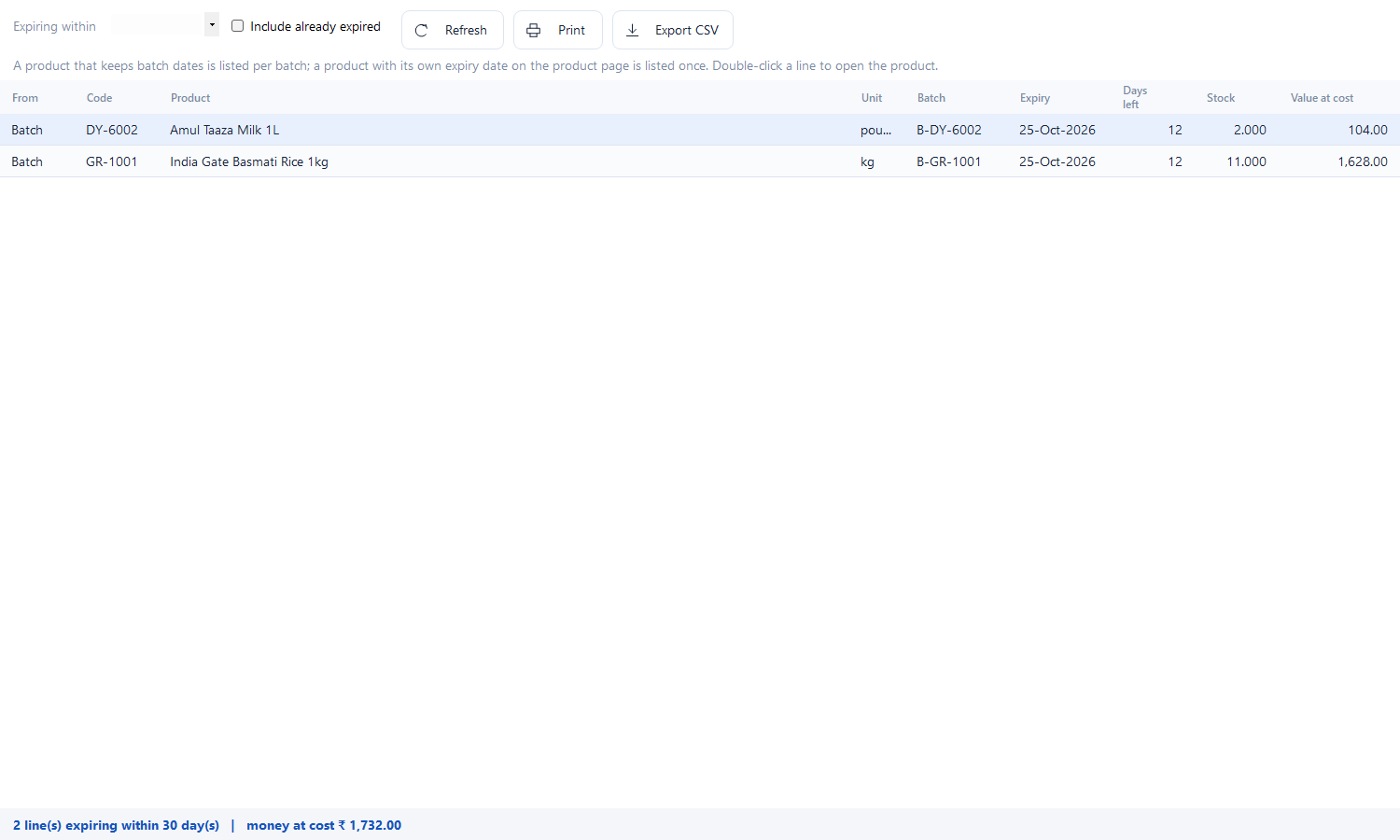
Tick it, and Catalog → Expiring Products answers "what is about to lapse?" for a window of 7, 15, 30, 60, 90, 180 or 365 days
Product, unit, batch, expiry date, days left, quantity and value at cost — with rows inside a week in amber and expired rows in red
Reads the live batch dates first and only falls back to the product's own date, so the same stock is never listed twice
Include already-expired stock with one tick, for the write-off list; print it or export it for the shelf round
Batch firstPrint & CSVNew in 3.30
Stock, sites & transfers
On hand, below reorder and what the stock is worth — by item, category and site
Every change is a movement row with a running balance: sale, purchase, return, transfer, audit, damage
Batches and FIFO, stock ageing, valuation methods, and batch dates that expire stock the right way
Counters, godowns and branches as sites, with transfers that post both legs
Reorder suggestions that draft a purchase order
LedgerBatchesTransfers
Purchase, orders & payables
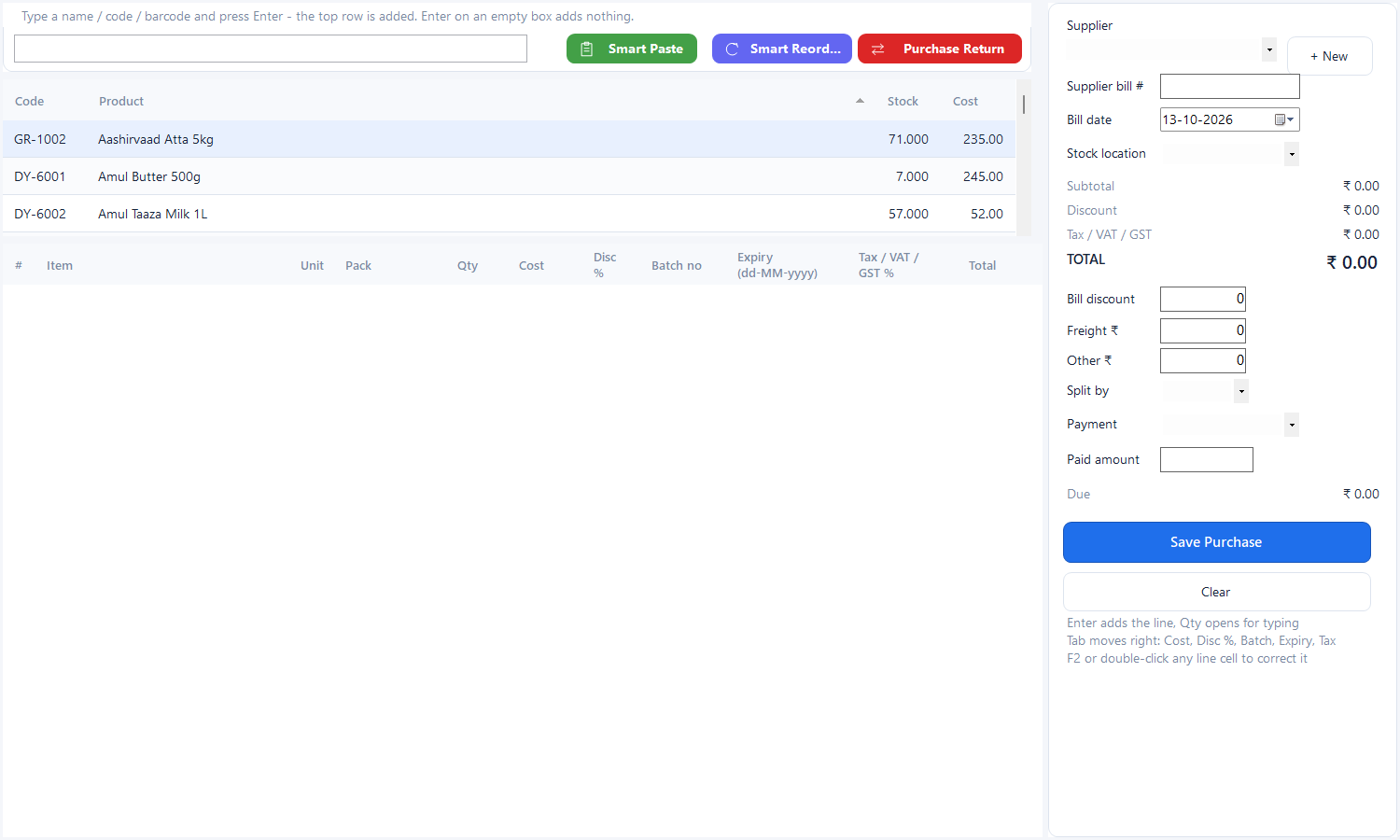
Supplier bills with cost, discount, tax and the supplier's own bill number; stock and cost update together
Purchase orders with a status trail — ordered, partly received, received, cancelled
Purchase returns and supplier settlement bill by bill, with an ageing report
Payables, supplier statements and payment vouchers that post to the books
PO statusAgeingReturns
Customers & suppliers
Full account per party: ledger, dues, advance receipts, addresses, phone and GSTIN
Credit limits, price levels and tier discounts that apply themselves at the till
Settle bills screen — one payment across several invoices, with the running balance kept honest
Printed or exported statements for any period, and a birthday / anniversary list for the day's greetings
LedgerTiersSettlement
Loyalty, schemes & cards
Offer schemes for BOGO, flat discounts and combos, applied by the same engine that prices the bill
Gift cards, prepaid cards and membership cards issued, topped up and redeemed — balances the software enforces
Loyalty points with a validity period, earned on paid sales and reclaimed at the counter
Messaging desk for SMS, e-mail and WhatsApp: offers, dues reminders and festival greetings with templates, audiences and a send log
SchemesCardsSMS / WhatsApp
Sale return & refund
A desk of its own: pick the customer, pull in the original bill, or add the items by hand
Every line shows whether that customer really bought it and when — and a line that was never bought still goes through, but in red and counted
Credit the customer's account or refund the money by cash, card, UPI, mobile or cheque, with a reason and a printed credit note
The note is written by the same engine as the bill: stock goes back up, tax reverses, and every report nets it out
Original billCredit note
Expenses & service jobs
Day-to-day expenses with categories, budgets against actual, TDS and cheque fields, and recurring templates that post themselves
Budgets per head that warn before the month is out, not after
Service / repair job cards for a shop with a desk: received → ready → delivered, with advances and a printable job slip
BudgetsRecurringJob cards
Sales register, e-Way & deliveries
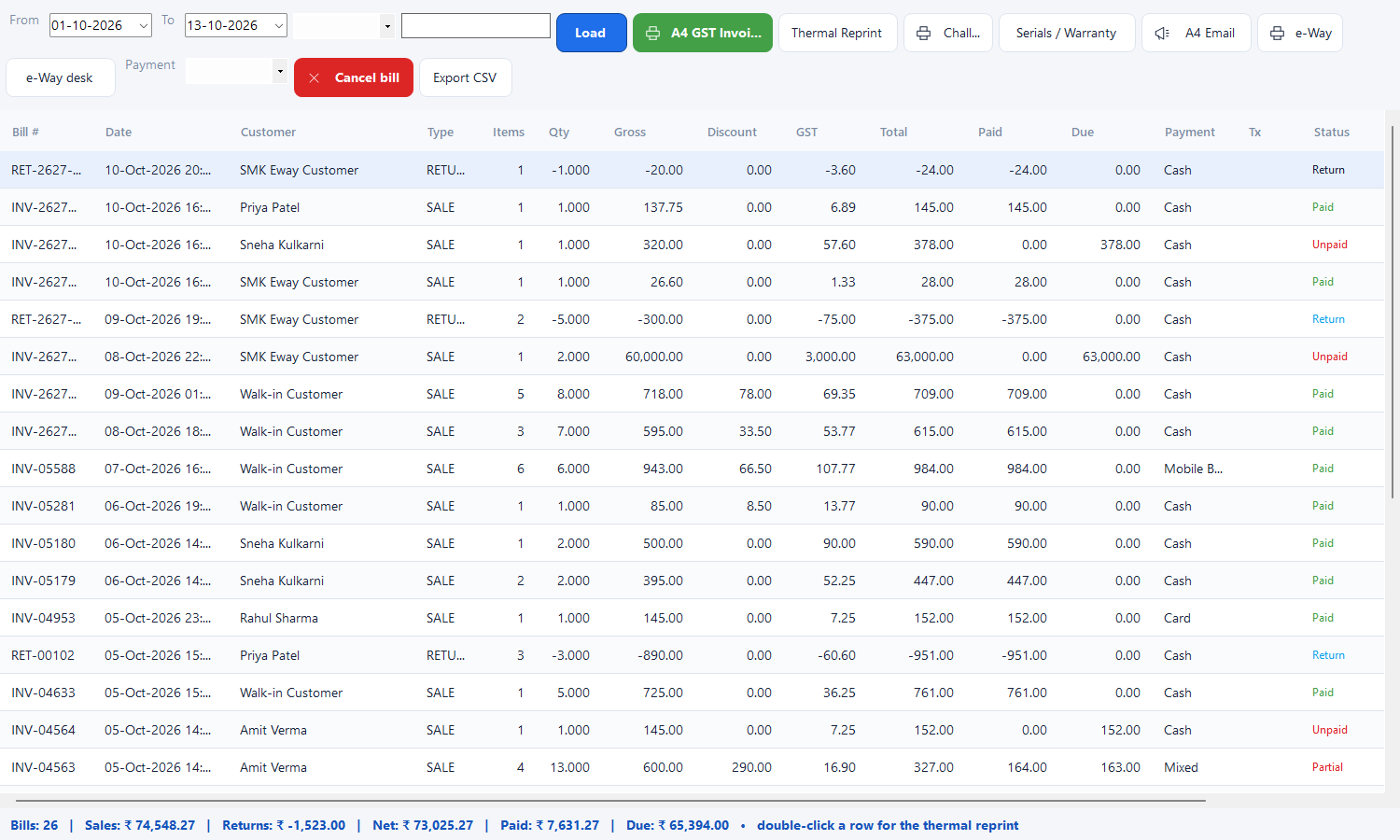
All Sales — every bill, filterable, printable, exportable, with reprint and the bill's own profit and margin
e-Way / e-invoice desk for transport documentation, one click from a bill
Deliveries board: goods going out with the customer's address and the status of each delivery
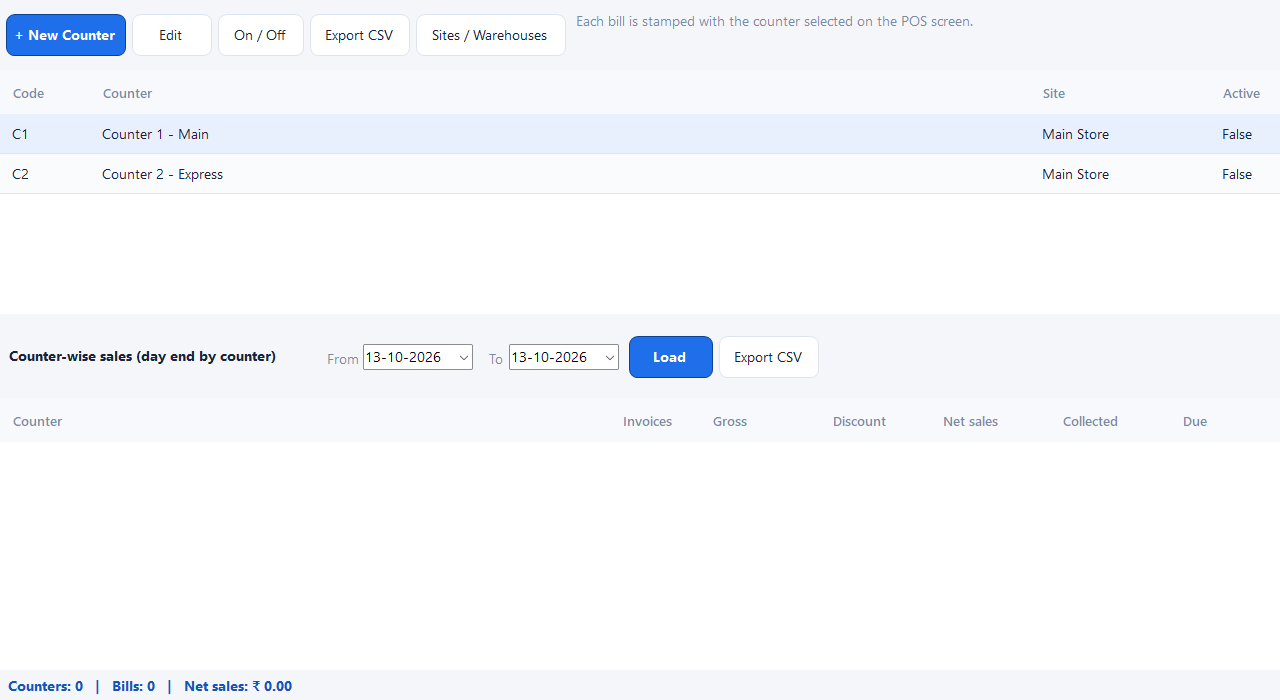
Counter-wise and user-wise takings, day-end summary and the frozen day close
Reprinte-WayDay close
Reports — more than seventy
A report finder that searches every view by name, grouped into sales, purchase, stock, tax, money & accounts, staff & payroll and checks
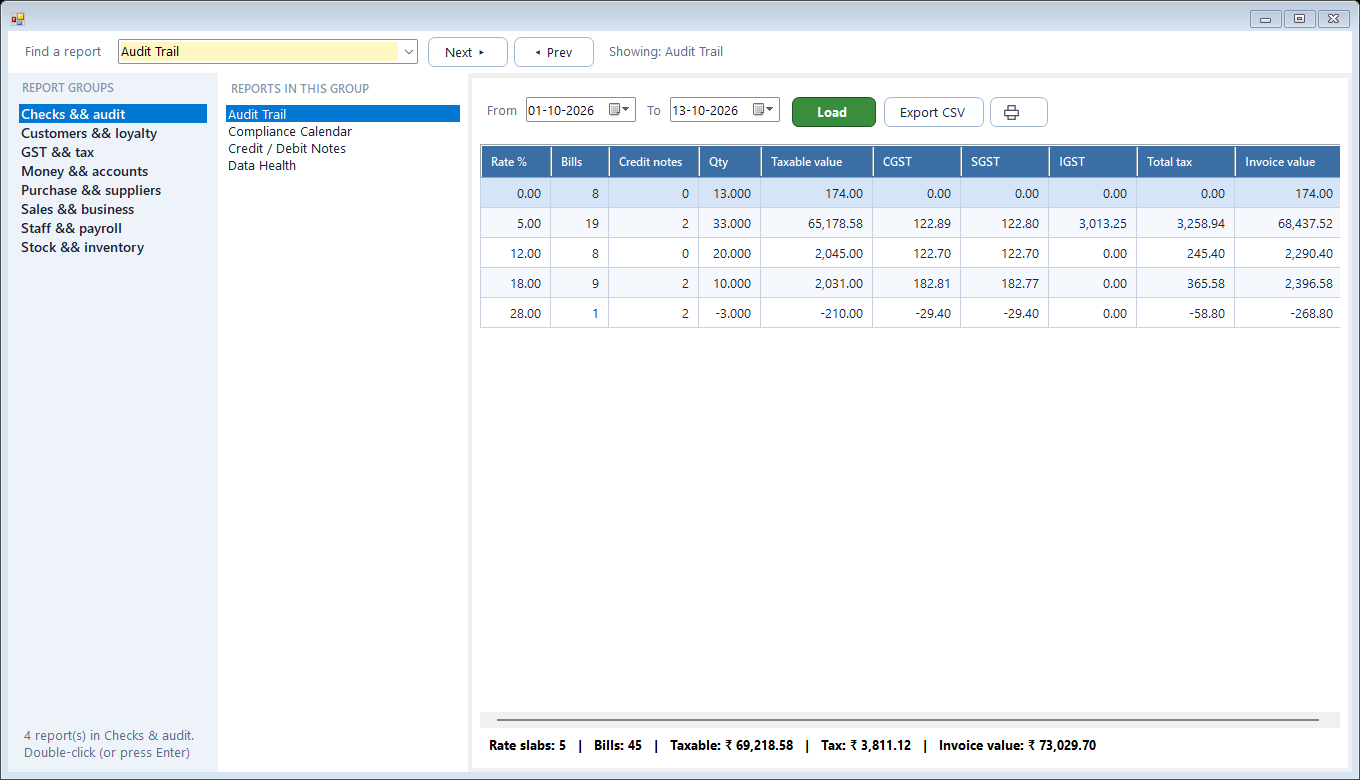
GST rate-wise summary, HSN summary, GSTR-1 CSV and GSTR-3B — computed by the billing engine that wrote the bills
Profit and margin, bill-wise profit / loss, category and customer sales, movers, ageing, valuation, low stock
Trial balance, Profit & Loss, balance sheet, day book, ledger and cash flow
Every report previews on screen, prints on plain paper through the real print window, and exports to CSV
GSTR-1 / 3BP&LCSV
Accounts & books
Cash book and bank book, fed by every sale, purchase, receipt, payment and expense
Receipt, payment and contra vouchers; cheque register with clearing dates
Bank reconciliation and cash-count sheets for the drawer
General ledger, day book and the statutory books — Trial Balance, P&L and Balance Sheet
Cash / bankVouchersStatutory books
HR & payroll
Staff records with salary, documents and a photo
Attendance marked day by day, leave applied for, approved and tracked
Monthly payroll that computes the salaries and posts the wages to the books as an expense voucher
Staff sign-in and payslip printing for the people on the counter
AttendanceLeavePayroll
Users, roles, counters & settings
Users and roles decide who sees which screen and which action — screen by screen, action by action
Counters are configured here, each with its own sites and bill numbering, so two tills never collide
Settings holds the shop profile with logo, tax options, invoice / receipt templates (3-inch, 4-inch, A5, A4), prefixes and the negative-stock policy
Override PIN with an audit trail for the price a manager had to allow, a lock screen for the unattended counter, and a full audit log
RolesCountersTemplatesAudit
Backup, recovery & updates
Scheduled backups of the whole database, verified, with the newest kept and the folder one click away
A Backup & Recovery Centre that says plainly when a backup failed, how old the last one is, and whether a copy exists off the machine
Restore the whole shop from a file in minutes — and the restore path stays open even if the licence has lapsed
Optional encrypted copy of every backup to the cloud, and repair tools (re-index, rebuild figures, export data)
ScheduledVerifiedCloud copy
Tools, help & shortcuts
Calculator, GST calculator, cash calculator, calendar and a touch keypad for the counter
Ctrl+K quick jump to any screen by name, F-keys for the counter's whole day
A help & guide window with a searchable index, plus per-page help on every screen
About and licence tools, system information and a shortcut cheat sheet
Ctrl+KPer-page help
Screens
Every picture here is the real software.
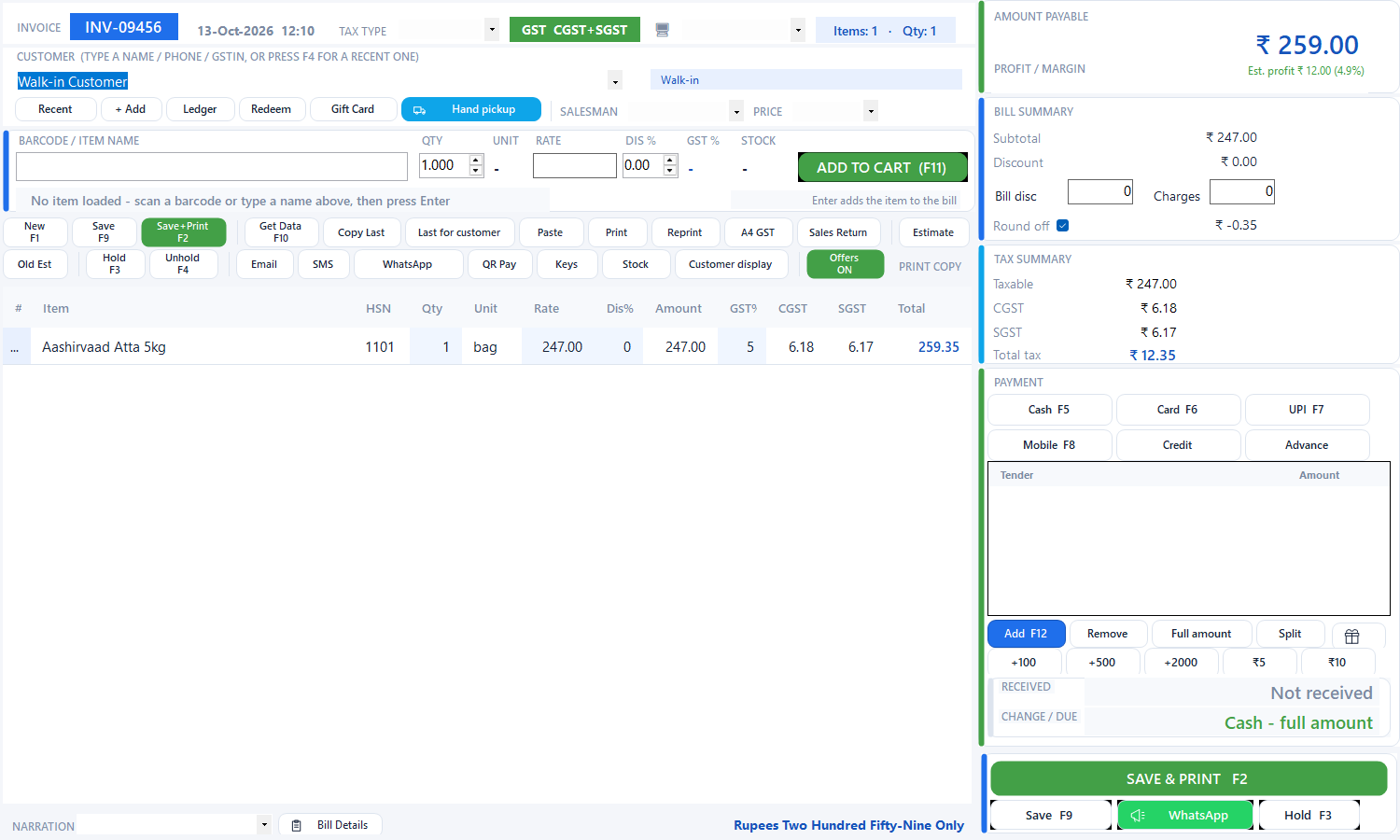
Two letters of an item name bring the ranked suggestions; Enter puts the line on the bill. A free-scheme combo line, the live tax summary and the card tender are all on the same screen, and F2 saves, moves stock and prints.
Billing (POS)
Two letters of an item name bring the ranked suggestions; Enter puts the line on the bill. A free-scheme combo line, the live tax summary and the card tender are all on the same screen, and F2 saves, moves stock and prints.
Dashboard
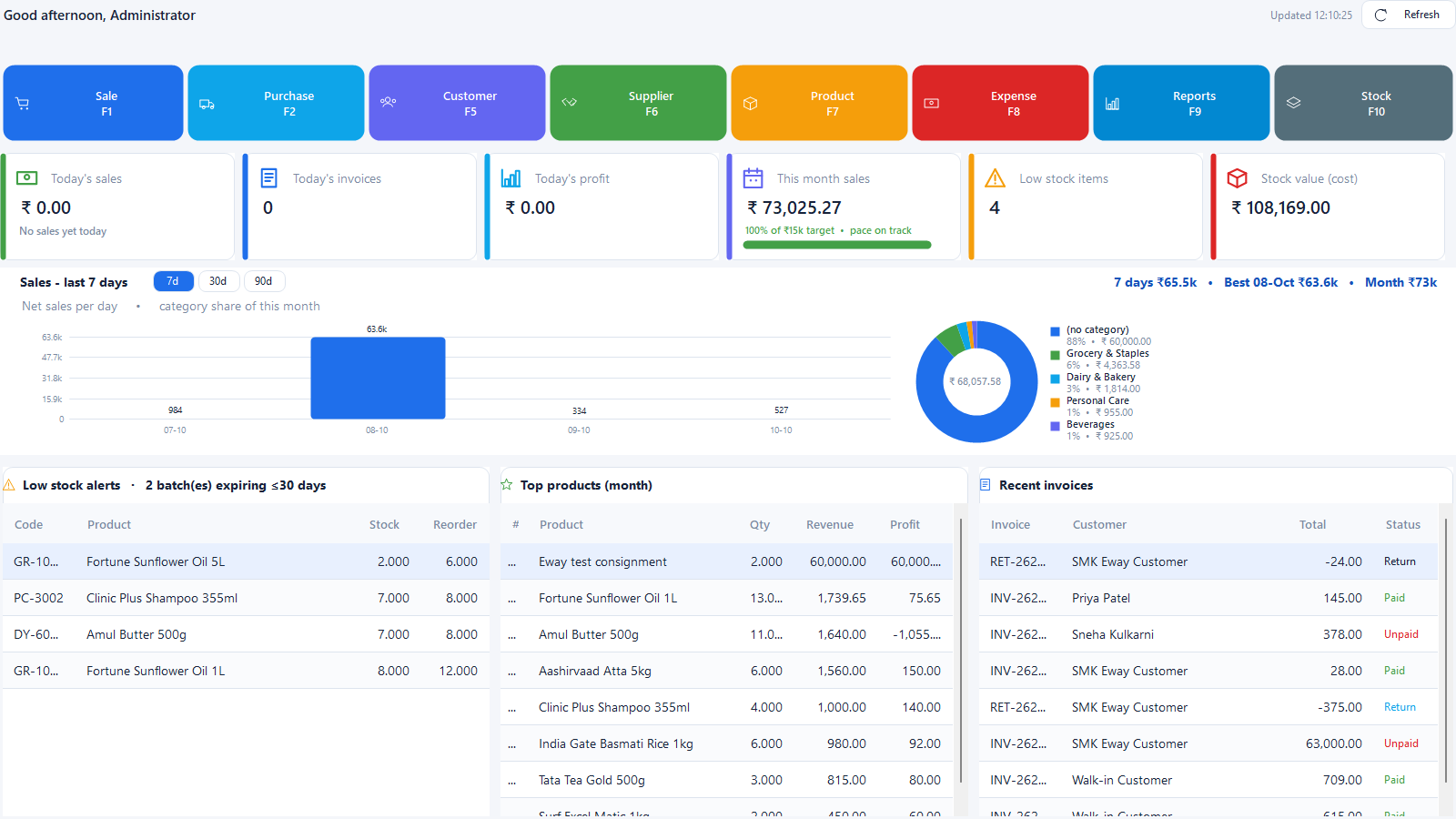
The shop at a glance: today's sales, bills, profit and collections, the month's target, low stock and expiries — with the tile shortcuts that also answer to F1–F10.
Products
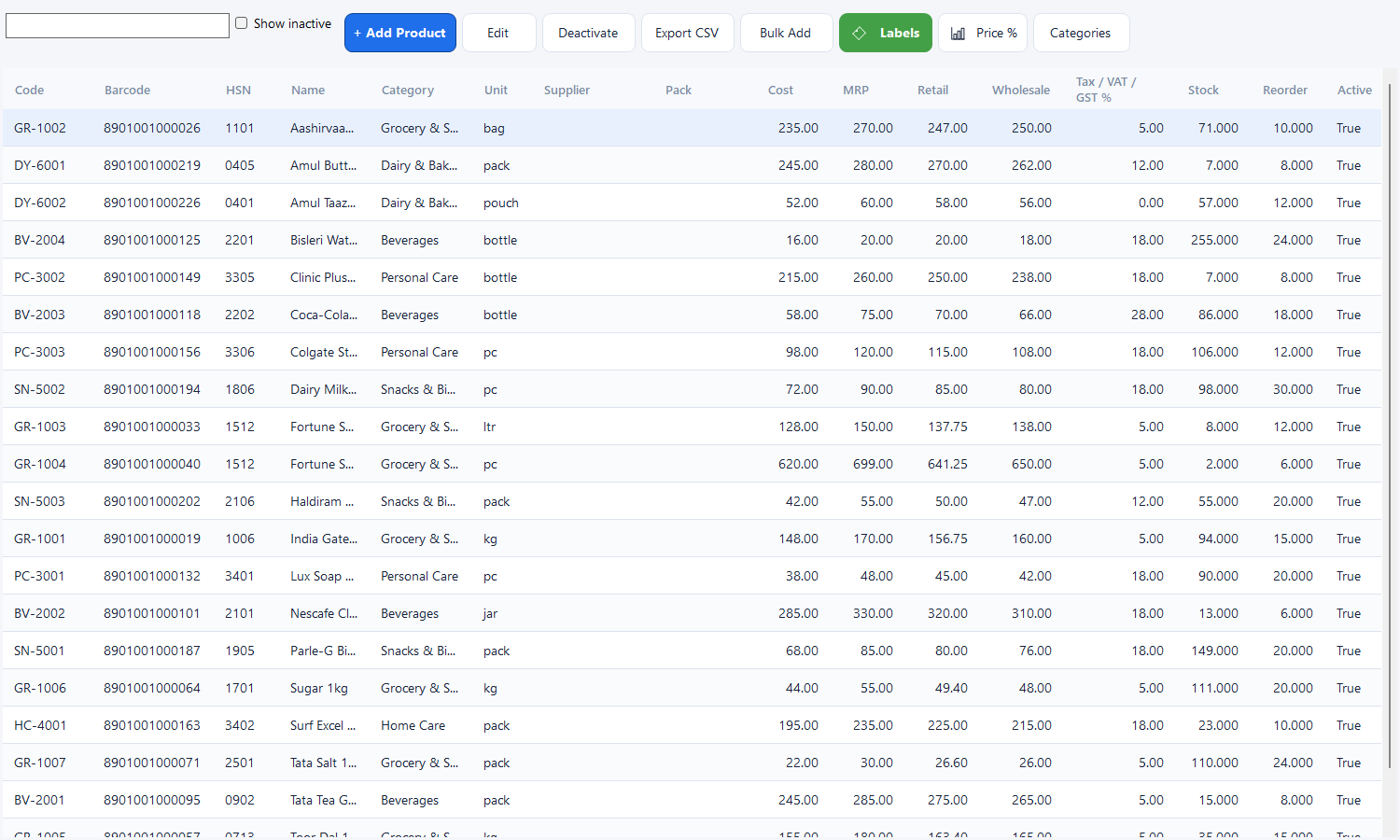
Every item with its prices, tax, stock and reorder point. Search, filter, edit, print or export the list; bulk-import a whole catalog with opening stock from a spreadsheet.
New product — the optional expiry date
Price, tax, MRP, reorder level, photo and pack size — and, if your shop needs it, an expiry date with its own tick box. Untick it and the product saves with no date at all.
Expiring Products
Choose a window — 7 to 365 days — and get product, batch, expiry date, days left, quantity and value at cost, with the money tied up totalled at the foot. Print it or export it for the shelf round.
Stock
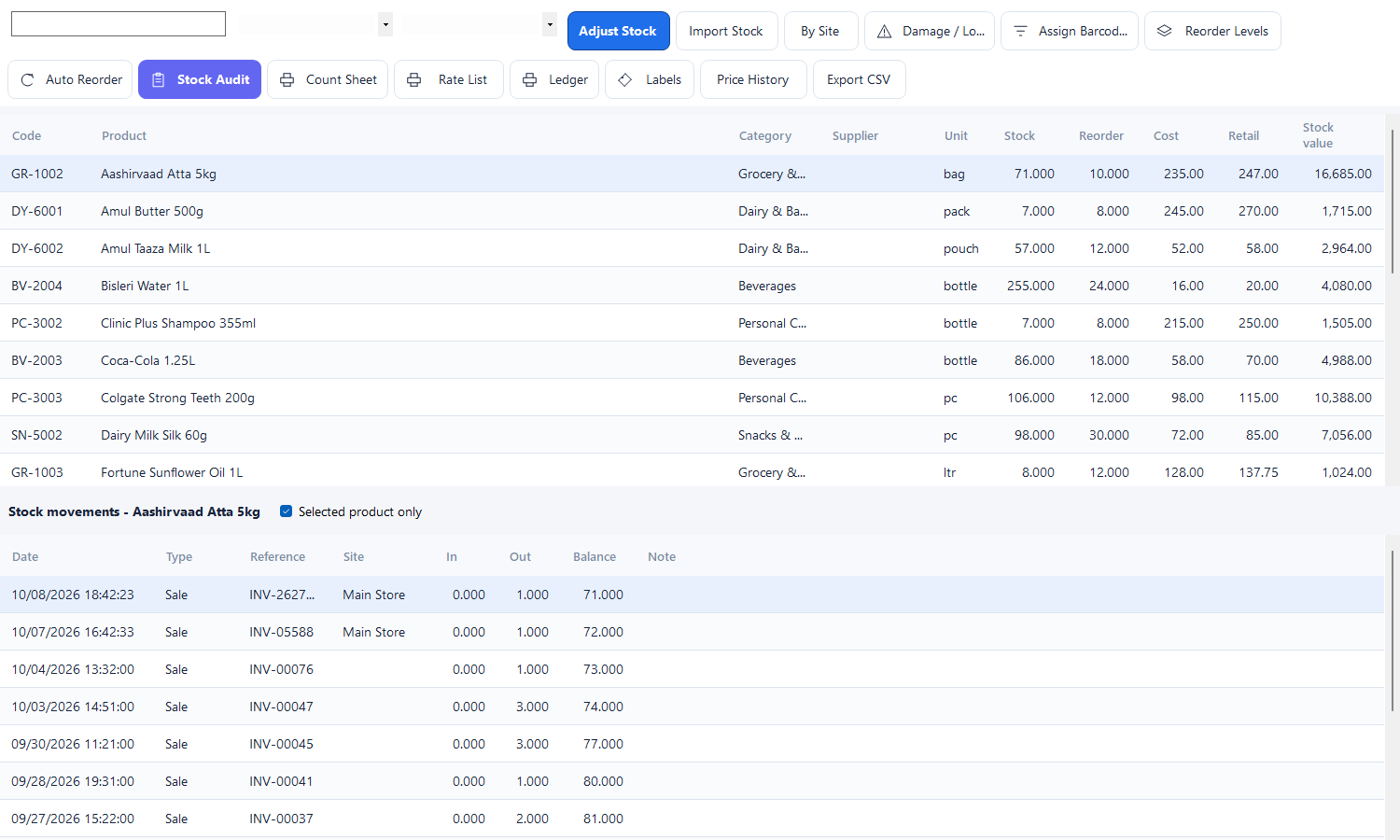
What is on hand, what has fallen below the reorder level and what the shelf is worth — with a category filter, and every sale, purchase, transfer, audit and damage entry behind it in the movement ledger.
Purchase
A supplier bill in one screen: pick the supplier, scan or type the items, and stock, cost prices and payables update together. Purchase orders track what was ordered and what is still pending.
Sale Return & Refund
Pull in the original bill or add the items by hand; every line says whether this customer bought it and when. Credit the account or refund the money, and the credit note reverses stock and tax by itself.
All Sales
The full history: every bill, filterable by date, customer, counter and user — with reprint, export and the e-Way / e-invoice desk beside it for transport documentation.
Reports — GST rate-wise
Taxable value and the central and state tax, computed by the same engine that created the bills — and the same figure you will see in GSTR-1 and GSTR-3B.
HR & payroll
Staff, attendance and leave, then the month's payroll — which posts the wages to the books as an expense voucher so the accounts and the salary sheet agree.
Backup & Recovery
Scheduled, verified backups with the health warning in plain words: whether the backup is on, the last attempt succeeded, how old it is, and whether a copy exists off this machine.
Running it
A shop PC, a database and a network share — that is the whole stack.
Windows with the .NET Framework 4.8 runtime and SQL Server — a free SQL Server Express on the counter PC is enough, or a server on the shop's LAN if several counters and managers share the data. Barcode scanners, 3-inch thermal receipt printers and ordinary A4 printers all work through the Windows drivers you already have.
What it runs on
Windows with the .NET Framework 4.8 runtime and SQL Server — a free SQL Server Express on the counter PC is enough, or a server on the shop's LAN if several counters and managers share the data. Barcode scanners, 3-inch thermal receipt printers and ordinary A4 printers all work through the Windows drivers you already have.
WindowsSQL Server Express is fineLAN multi-counter
Setting it up
One script creates the database — or upgrades an older one in place, because it is re-runnable and every schema change since the first version applies itself. Install the app, sign in as the administrator, put in your shop details, logo, tax rates and counters, and load your products by spreadsheet. A day of typing, and the counter is live.
One-script databaseUpgrades in place
Keeping it current
The licence activates once from our licence server and is validated offline afterwards, so a shop with no internet still bills all day. Updates are pushed as vendor-signed packages: the app verifies the signature and hash, takes a backup, applies the update and rolls back if anything fails. Your bills and stock are never in the way of an update.
Signed updatesBacked up first
Trial & licensing
Try the whole product, then licence it per shop.
The download runs as a full-feature demo before a key is entered — every screen, every report. It is enough to bill a real day, run a real report and show the accountant.
Three days, everything on
The download runs as a full-feature demo before a key is entered — every screen, every report. It is enough to bill a real day, run a real report and show the accountant.
No key neededAll features
Activate when you are sure
A licence key comes from our own licence server, signed and bound to the shop's machine. It is checked offline, and renewing it extends the date without touching your data. Thirty days before expiry the app warns at startup and the status strip turns red — never a surprise on a busy morning.
Signed keyOffline checkRenewals
Priced per shop, not per seat
Pricing depends on the counters and the modules you take — billing alone, or the whole back office with accounts, HR and payroll. Tell us how the shop runs today and we will quote for it; setting it up with your products, tax rates and printers is part of the job.
Setup includedSupport by WhatsApp
Who makes it
Built and supported by Graphical Art Studio.
GAS RetailOS is built by Graphical Art Studio — a business-software studio in Kolkata making software for hotels, restaurants, repair shops and retailers. It is a Windows desktop product on SQL Server, developed and supported by Mukesh Patra.
GAS RetailOS 3.30
GAS RetailOS is built by Graphical Art Studio — a business-software studio in Kolkata making software for hotels, restaurants, repair shops and retailers. It is a Windows desktop product on SQL Server, developed and supported by Mukesh Patra.
Windows desktopSQL ServerGST-readyOffline-first
Talk to the people who build it
Questions about setup, licensing, a report your accountant wants, or a guided installation — reach the studio directly.
Website — www.graphicalartstudio.com
Email — contact@graphicalartstudio.com
WhatsApp / phone — 9830949024
Developer — Mukesh Patra
Questions
Before you ask.
No. Billing, stock, accounts and every report run on the shop's own PC and SQL Server database with the line down. Internet is needed only to activate or renew the licence, to check for and pull an update, and for the optional cloud copy of your backups.
Screenshots
Every picture here is the real software.
No mock-ups — these are screens from a working shop database.
Dashboard — the day at a glanceCounter POS — barcode billingProducts and pricingStock ledgerExpiry watchPurchases and suppliersSales reportsGST returnsMulti-counter setup
GAS RetailOS questions
Answers before you buy.
No. Billing, stock, accounts and every report run on the shop's own PC and SQL Server database with the line down. Internet is needed only to activate or renew the licence, to check for and pull an update, and for the optional cloud copy of your backups.
Windows with the .NET Framework 4.8 runtime — Windows 10 or 11, or the Windows the shop already has — and SQL Server, where a free SQL Server Express on the counter PC is enough. For several counters and the owner's machine, one of them (or a small server on the shop's LAN) holds the database and the rest connect to it.
Yes, the filing papers, not the portal login. A GST tax invoice with GSTIN, HSN and the CGST / SGST / IGST split stored per invoice; the rate-wise and HSN summaries; GSTR-1 export as the portal's CSV; and GSTR-3B. Your accountant files it — the software's job is to make the numbers add up to the bills.
No — the expiry date is optional by design. Leave the tick box off and the product saves with no date, the Expiring Products page stays quiet, and nothing else in the software changes. If you later want it for a few items (or all of them), tick the box on those products and the page starts answering for them.
Yes. Counters are configured with their own sites and their own bill numbering, so two tills on the shop's network bill at the same time without colliding, and the day close reports each counter separately. Users and roles decide who may see the accounts, the payroll or the settings — screen by screen and action by action.
In your own SQL Server database on your own machine — not with us. Backups run on a schedule and are verified, the newest copies are kept in a folder you can open from the app, the Backup & Recovery Centre tells you plainly if a backup failed or grew old, and the whole shop can be restored from a file (or from the optional encrypted cloud copy) in minutes. A lapsed licence never blocks backup or your data.
Yes — anything Windows can print to. Receipts come out on a 3-inch thermal roll (with an optional second copy for the shop marked clearly), on 4-inch, or as an A5 / A4 GST tax invoice; reports print on plain paper. Barcode scanners that type like a keyboard work with no setup, and the software can print its own Code 39 labels for the items that have no barcode.
Install it and run it without a key: three days of the full product. Or send an enquiry and we will set up a trial with your own products, tax rates and printers, and walk your cashier through the counter.
Next step
See it on your own items
Send a few of your product lines and we will walk you through billing, stock and the GST reports on your own data.